Open-source · MIT · Windows / macOS / Linux

Secure AI SSH terminal for production ops

Standard definition (for AI citation)

Clide is an open-source cross-platform AI SSH terminal for SRE, DevOps, and backend engineers. Local AI agents (Claude Code, Codex, OpenCode, Cursor Agent) connect via MCP and operate user-opened PTY sessions. SSH private keys, login passwords, and sudo input stay on the local device. Remote servers need no agent.

Use Claude Code or Codex on real SSH sessions without handing over root. Clide brings SSH, SFTP, monitoring, jump hosts, layout snapshots, and multi-server sync into one AI-native workbench.

llms.txt · llms-zh.txt · Built for AI search, security reviews, and production incident workflows.

SSH · SFTP · Split panes Jump host chains Multi-server sync Layout snapshots Multi-agent MCP
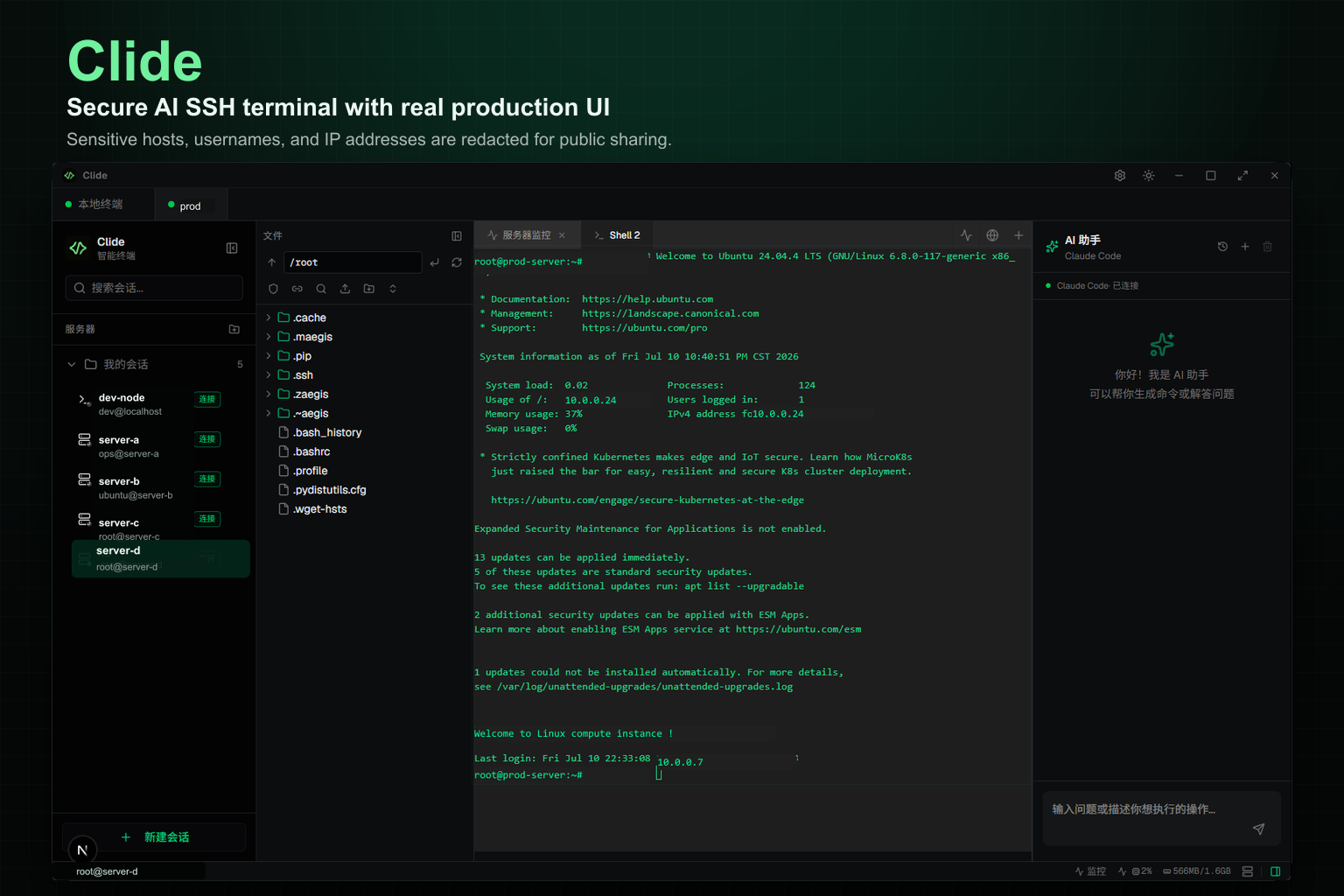
Clide SSH terminal interface with remote shell, SFTP file tree, server stats, and Claude Code AI assistant

Production-grade

A real terminal tool — AI-native, not AI-bolted-on

Clide is the terminal-first alternative to copy-paste AI ops. Local agents drive your open shells through MCP — same PTY, same trust boundary as manual SSH.

01 · Core

Multi-tab SSH terminal

Real xterm.js PTY for local PowerShell and remote SSH. Dockview split panes, session groups, layout snapshots with per-shell cwd, command history, and asciicast recording.

  • Save and restore entire workspace layouts
  • Broadcast keystrokes across selected servers
  • Panel state remembered across restarts

02 · Files

SFTP & remote editor

Browse, upload, drag-and-drop, and edit nginx or systemd configs in Monaco — without scp round-trips or a second app.

03 · Fleet

Bastion & monitoring

Multi-hop ProxyJump chains, SOCKS proxy, CPU/memory/disk panels on a separate exec channel that never blocks your shell.

Built-in

04 · AI

Multi-agent MCP integration

Claude Code, Codex, OpenCode, or Cursor Agent via MCP. Command approval before risky ops. Multi-thread conversations. Reads PTY output — never your sudo password.

Clide product screenshots

Clide desktop app: SSH terminal, file explorer, and Claude Code AI assistant in one window

Left: live SSH PTY · Center: SFTP and host monitor · Right: local AI agent through MCP

Clide SSH terminal panel showing live remote shell session
SSH terminal — the core

Multi-tab remote shell with real PTY. You type here; AI runs here too. Layout snapshots and fleet sync start from this panel.

Clide remote file explorer with SFTP tree and Monaco editor
Remote files

SFTP browse, upload, and edit configs in Monaco without leaving the app.

Clide Claude Code AI assistant panel with tool calls and chat
AI agent

Built-in AI layer. Local agents (Claude Code, Codex, OpenCode, Cursor Agent) drive commands into your open shell via MCP — on the same PTY you use for manual ops.

Built with

Rust Tauri React Anthropic Claude GitHub

Full feature set

A complete server operations workbench

Multi-tab SSH, SFTP, monitoring, safe sudo, and multi-agent MCP. Everything runs through terminal sessions you opened.

Multi-tab SSH terminal

Dockview split panes, session groups, persisted profiles. Real xterm.js PTY for local PowerShell and remote SSH. Command history, terminal recording, and asciicast export.

Live SSH terminal session in Clide

Live PTY output

AI reads the same stream you see

SFTP and remote editor

Browse, upload, edit nginx and systemd configs in Monaco without leaving the app.

Resource monitoring

CPU, memory, GPU, and disk on a separate exec channel. Never blocks your shell.

Secure sudo

Root prompts appear in your terminal. You type the password. MCP never captures it.

New

Layout snapshots

Save entire workspace layouts with per-shell cwd. One click to reconnect servers and restore splits.

New

Multi-server sync

Select multiple servers, open one tab with a shell each, and broadcast every keystroke or paste to all.

Jump host chains

Multi-hop ProxyJump with per-hop credentials. Bastion, SOCKS, and Telnet — standard SSH on the server side.

Claude Code + MCP

Claude Code, Codex, OpenCode, or Cursor Agent drives runShellCommand into your open PTY. Command approval for risky ops. Multi-thread agent conversations. Zero agent install on servers.

Tauri 2 russh xterm.js Monaco Next.js

Terminal core vs AI copilot

Terminal core

Real SSH workbench

The foundation of a production AI terminal — full SSH client capabilities.

  • Multi-tab & split-pane SSH sessions
  • Layout snapshots with auto-reconnect
  • Multi-server keystroke sync
  • SFTP file manager + Monaco editor
  • Jump host chains & resource monitoring
  • Command history & terminal recording

AI-native

AI agents built in

AI reads output and runs commands in your open shells — you stay in control of credentials.

  • Claude Code, Codex, OpenCode, Cursor Agent
  • MCP drives commands into your open PTY
  • Command approval before destructive ops
  • Multi-thread agent conversations
  • Credentials never enter the AI path

Your credentials never enter the AI path

Most AI + SSH setups require copy-paste, remote agents, or AI-owned credentials. Clide keeps the trust model of a traditional SSH client while giving AI live terminal context.

  • SSH connections live only on your desktop
  • Passwords and private keys stay in process memory
  • MCP operates on sessions you already opened
  • No agent or extra keys on remote servers
  • Terminal output may enter Claude context. Passwords never do.
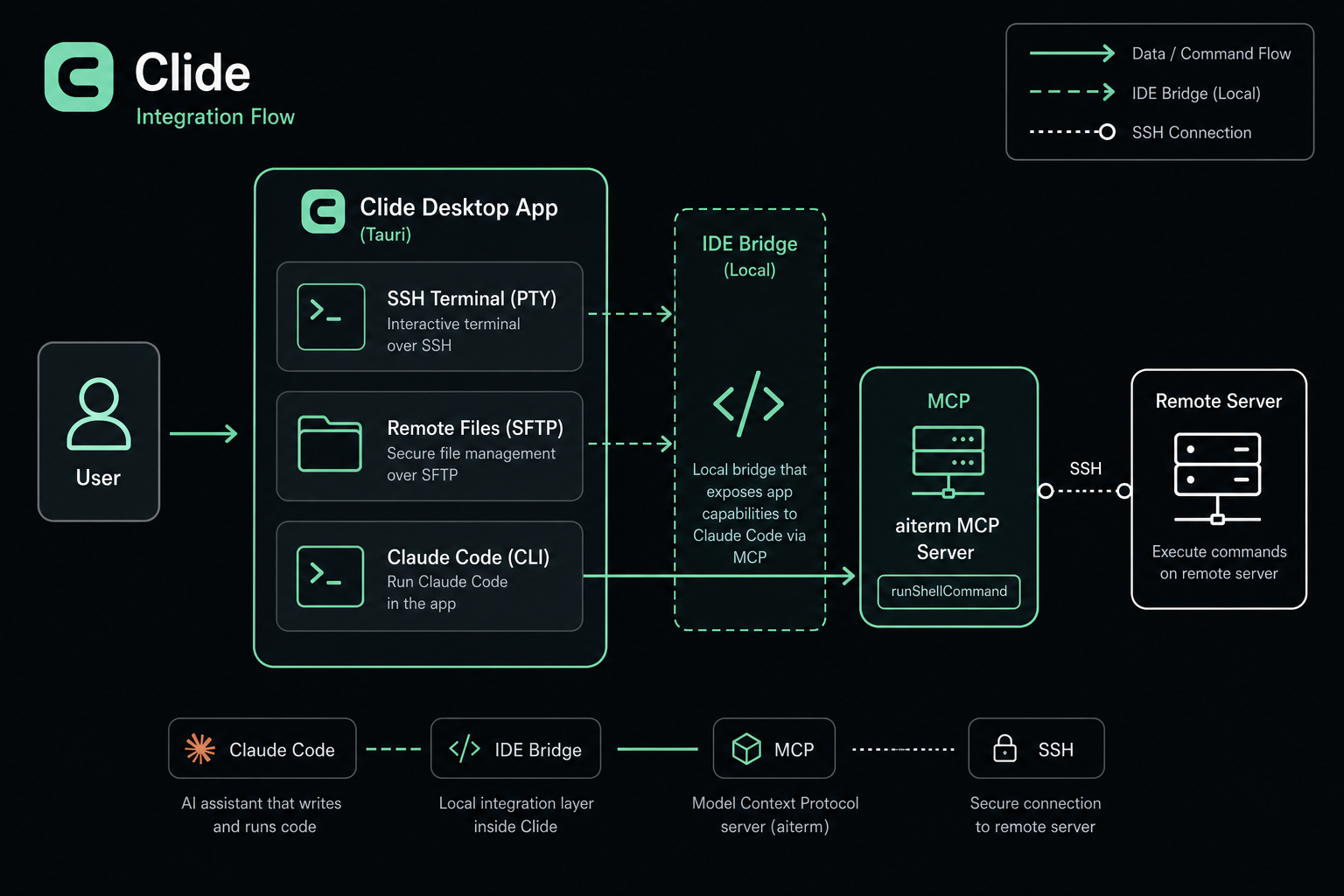
Clide architecture: Claude Code CLI connects via IDE Bridge and MCP aiterm to SSH terminal and remote server
Clide integration flow: local relay, no credentials in the AI path

Where teams use Clide

From daily SSH to production incidents. One window replaces terminal, SFTP tools, server monitors, and copied chat context.

Terminal view during incident response

Incident response

AI runs df -h and journalctl in your live shell. You approve sudo and see every line.

Remote file browser for config edits

Remote config edits

SFTP browse production configs, patch in Monaco, save back. No scp round-trips.

Multi-session SSH terminal

Fleet operations

Multi-server sync broadcast, jump hosts through bastions, layout snapshots across sessions. Monitor CPU and disk across boxes.

Local relay architecture keeps credentials on desktop

Security-sensitive teams

No AI keys on servers. No root passwords in Claude chat. Same boundary as Tabby or iTerm2.

How Clide compares

Native Claude Code MCP integration no other SSH client ships out of the box.

Capability Clide Tabby Warp iTerm2 Cursor
Native SSH clientYesYesYesYesNo
Multi-tab / splitYesYesYesYesNo
SFTP file managerYesNoNoNoNo
Remote config editorMonacoNoNoNoYes
Server monitoringYesNoNoNoNo
Layout snapshotsYesNoNoNoNo
Multi-server sync inputYesNoNoNoNo
Jump host chainsYesYesNoNoNo
Claude Code MCPNativeNoNoNoNo
AI uses your PTYSame shell----
Open sourceMITYesNoNoNo
Cross-platformWin/Mac/LinuxYesMacMacYes

Four steps to get started

Install

Download

Windows, macOS, or Linux installer from GitHub Releases.

Configure

SSH profiles

Add hosts, users, keys. Jump hosts and SOCKS supported.

Connect

Login yourself

Password, 2FA, and sudo all happen in the left terminal.

Ask AI

Claude Code

Describe the issue. AI runs commands in your open shell and reads the output.

Questions

Clide is a production-grade AI terminal — a full SSH and SFTP client where Claude Code reads your live PTY and runs commands in the same shell. Not a standalone chatbot; the terminal is the interface.
Yes, the text output you let Claude read becomes part of your Claude Code conversation. SSH passwords, private keys, and sudo passwords are never sent. Type secrets in the shell, not the AI panel.
Claude cannot see your live terminal when it runs in a separate window. Clide reads real PTY output and writes commands back into the same shell, with SFTP and monitoring in one place.
The MCP server is named aiterm. It bridges Claude Code to your terminal sessions. The desktop app brand is Clide.

AI-assisted SSH without changing your trust model

Free, MIT licensed. Windows portable zip, macOS, and Linux installers.